
You can access this window by pressing the party hotkey ‘P’. As a leader, this window will allow you to change the settings of your party.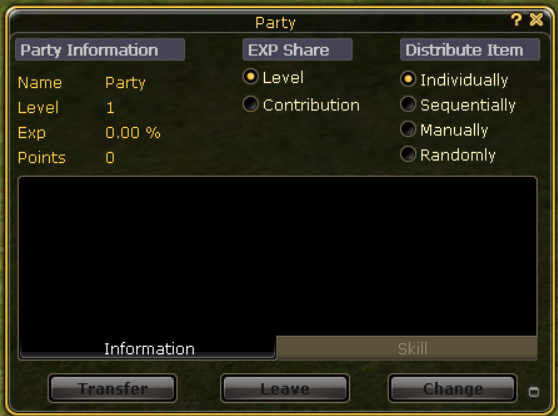
Party Information
This shows your party name, level, exp, and points.
- Nam:e The name of your party. will be “Party” until you assign a different name once you reach advanced party..
- Level: The level of your party. You gain more party points for each level.
- Example. For each kill that is made from a group of 2 or more people in the same area, the party will gain experience. Upon hitting 100% the party level will increase.
- Points: The remaining amount of party points is used on skills when you have an advanced party.
EXP Share
The way that experience is distributed among the members.
- Level: This is the starting setting for any party and can not be changed until the party is advanced. In this setting, members will receive a share that relates to their current level.
- Contribution: This setting gives the most experience to the person who is a contributing member.
Distribute Item
This is the way that items are shared between the party members.
- Individually, the person who picks up the item gains it.
- Sequentially, Items are divided equally among the members.
- Manually, the party leader gains all the items to redistribute later.
- Randomly, Items are passed to members.
Main Window
This lists the members in order of when they joined the party, with the leader at the top. If the leader logs off, the party is automatically passed to the next person on the list who is logged on. The party can hold a maximum of 8 players.
There are boxes next to the name of each member, which show as different colors depending on the status of the player.
- Grey Box: Player is online and not within range of you.
- Black Box: Player is offline.
- Blue Box: Player is online, within range of you, and alive. You can also see their health bar in the party window.
- Red Box: Player is online, within range of you, and dead.
- Yellow Box: This player is online, within range of you, but is near death.
Transfer
If you are the party leader, you can transfer the leadership of the party to any other online member by selecting their name in the party window and clicking transfer.
Leave
By pressing this, any member can leave the party. If you are the party leader, you can also kick people from the party by selecting their name and then clicking Leave.
Change
When the party reaches level 10, you can change to an advanced party by clicking this. You can then name the party and gain access to the party skills. If you do not change the party to Advanced, the party will not level up any further.
Party Skills can be used by the leader in an advanced party. Each skill benefits the party in some way. The basic skills (Call, Blitz, Retreat) are available as soon as you change to advanced. The others require the party to be of a higher level.
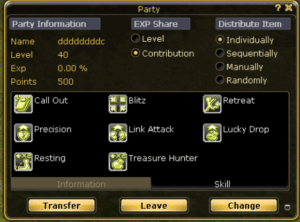
 Call Out: Informs all party members of the location of the party leader.
 Blitz: Party leader orders party members to attack a target.
 Retreat: Party leader orders all party members to retreat.
 Precision: While the party leader and party members are attacking a target, the critical strike rate increases.
 Link Attack: While the party leader is attacking a target, damage increases for party members attacking the same target.
 Lucky Drop: Increases the chance of masquerpets dropping unique items.
 Resting: Party members recover 1.5 times faster. If the party leader is an Assist, party members recover 1.8 times faster.
 Treasure Hunter: Increases the amount of items dropped by masquerpets.
- Contribution Parties give extra experience to all players who have at least one partner next to them.
- The Contribution Party’s experience bonus gives more experience than what would be gained by a level distribution party to all players in the party who have a partner. That is why almost no level distribution parties exist.
- The maximum level difference is 24 between the players, so you still gain experience when leveling in the same area.
- A full advance party will increase the experience gained.
- Using
 Enhanced Party Skill Range will benefit the party leader immensely by having their Damage increase when the scroll is active (Link Attack increase only works for Leaders)
 - Using Enhanced Party Skill Range will also benefit everyone in the party. When you use both drop party skills, it will be effective for everyone, no matter which channel they are on.
- You can have unlimited party points by using
 Scroll of Party Amplification, and if you combine it with
  Scroll of Party Skill, you will then be able to spam the skills to stack the timers
 - Some scrolls boost the EXP of the ADV party to level it faster, such as
 Scroll of Party EXP or the
  Blessing of Party Leader, and these 2 can be combined to level the ADV party even faster.
 - There are 2 different types of scrolls that a player can use to gain an additional x1.5 EXP multiplier (50% EXP) effect whilst fighting, and they are
 Scroll of EXP Enhancement (solo player) and
  Scroll of EXP Enhancement (8 player party).