
Starting NPC
| Makeup Artist | Location |
 |  |
|---|
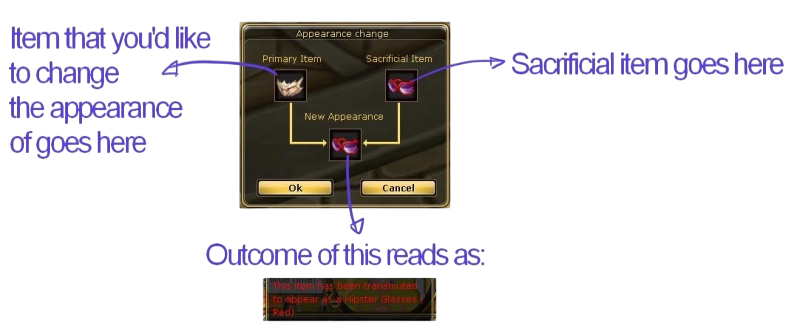
Transmutation serves to change the physical appearance of an item, and nothing more. It can change the appearance of any piece of equipment to another of the same type, e.g., when transmuting cloaks, the gender must match. This includes weapons, armor, and fashion (Sword+Sword or Suit+Suit, etc). A Psykeeper can, in fact, transmute their armor to appear as a Knight set. To use the system, visit the Makeup Artist NPC in the north square of Flaris city and select the Transmutation option from the menu.
The Primary Item is the item you wish to change the appearance of. The final result is an item that is actually a Primary Item, but has the appearance of the Sacrificial Item. To that end, this means that to transmute an item, you will be sacrificing an item.
Reverting
It is possible to revert the appearance change, but you will not get the sacrificial item returned to you. To revert the appearance of a transmuted item, you will need a Revert Transmutation Scroll  , which is available to buy from the Cash Shop. To use the scroll, double-click on it and then click on the transmuted item that you want to revert.