Table of Contents

Guilds

Guilds are an integral part of FlyFF. An MMORPG is based on its community, and guilds are the most permanent way for players to band together. Through guilds, players can chat with each other, quest, clockwork, Guild war with other guilds, Guild siege, and Tower Siege.

What is a Guild?

Many of you , as you play, come to wonder what these small groups, or teams, are that call themselves guilds.

A Guild is:

1. An organization of persons with related interests, goals, etc., esp. one formed for mutual aid or protection.

2. Any of various associations, as of merchants or artisans, organized to maintain standards and to protect the interests of its members, and that sometimes constituted a local governing body.

Every Guild is a family, a team, a governing body. There is the Master/Leader, Kingpins, Captains, Supporters, and Rookies. They all guard each other and work together to create relationships and as a small active community; they play together, level, shop, PvP, and especially Clock War together. Each Guild is almost like a Tribe, they compete against other Guilds and thrive to be the best Guild in their Cluster.

Many Guilds do not make a community solely on playing the game competitively, many are based on similar interests or the hunger for a community of friends to have fun with.

Each Guild has the chance to pick cloaks, an emblem, and can participate on Guild Events. However, in order to participate in any of these you must first level your Guild to the requirements each entail.

Making a Guild

Before you create a Guild, you must be the required level 40, and must take time to think of a Guild name.

First, gather what you need:

  • 3 million penya
  • Lead of a party with 2 other players that are eligible to enter a guild (they will be your first members). To be eligible a person must not have been in a guild in the past 48 hours.

Second, speak to Helena (Saint Morning, Bank NPC).

  • She will ask for the 3 million penya first.
  • After handing in the 3 million penya, she will ask you to lead a 3 player party.
  • After speaking to her again, click on “Create a Guild”, and your guild will be created.

Note that for any future guilds you make, you will not have to undergo this quest. You can create a guild directly by being the leader of a 3-player party where everyone is eligible to join a guild, and talking to Helena.


Managing a Guild

After creating your guild, you will want to learn to manage it. The options are all found on the guild window, which you can access via the “G” hotkey or by going through your Start menu.

Guild Warehouse

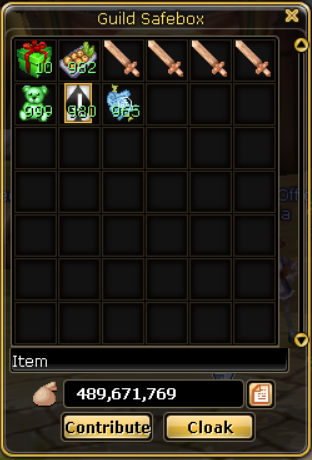
The Guild Warehouse is available at all Bank NPCs on Server 1. Just select the Guild Warehouse option when you click on the NPC. There, you can donate quest drops and penya to the guild, as well as place and remove penya and items in the warehouse.

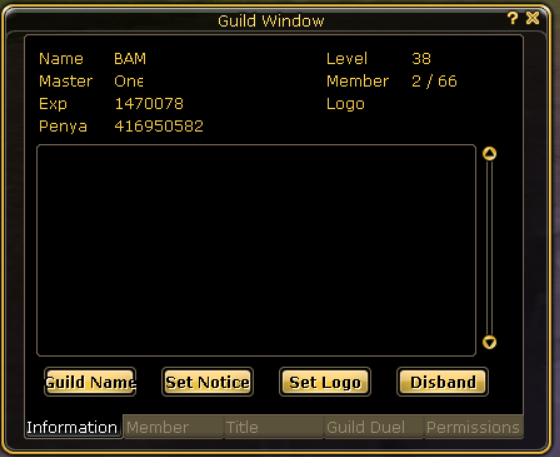
The Information tab is where you can make your major guild changes.

  • “Name” button – change the name of your guild (only viable once)
  • “Notice” button – change your notice whenever you want (note that there is a very low character limit to the notice)
  • “Logo” button – choose a logo for your guild once it reaches level 4. The logo cannot be changed once chosen.
  • “Dismiss” button – disband the guild.
 

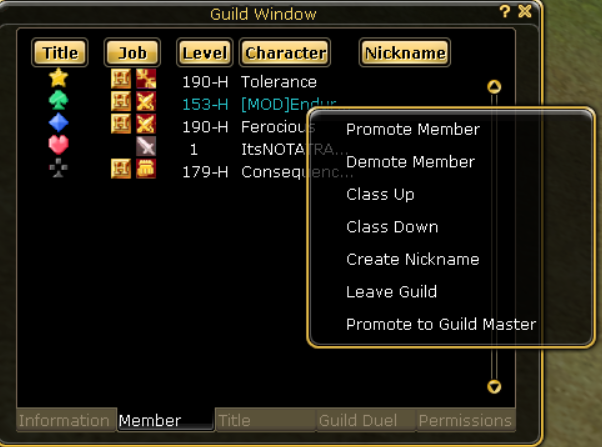
The Member tab is where you can manage the ranking of your members, as well as other features. As a leader, once you right-click on a member’s name, various options are available. While members with the right permissions (explained in the next tab) will be able to use some of these options on other members, some options are only available to the leader.

  • “Promote Member/Demote Member” – To change the ranking of a member between (in order of tier) Rookie, Supporter, Captain, and Kingpin. Members with ranking permissions can use this option on other members beneath their rank and class.
  • “Class Up/Class Down” – To differentiate ranking inside each rank, these options allow you to increase or decrease the number of icons beside their name (or their class) between 1 and 3. Members with ranking permissions can use this option on other members beneath their rank and class.
  • “Create Nickname” – At level 10 of the guild, the leader can give nicknames to specific members with this option. There is a strict character limit.
  • “Leave Guild” – A leader can kick members with this option, and this option is how members can leave the guild themselves.
 

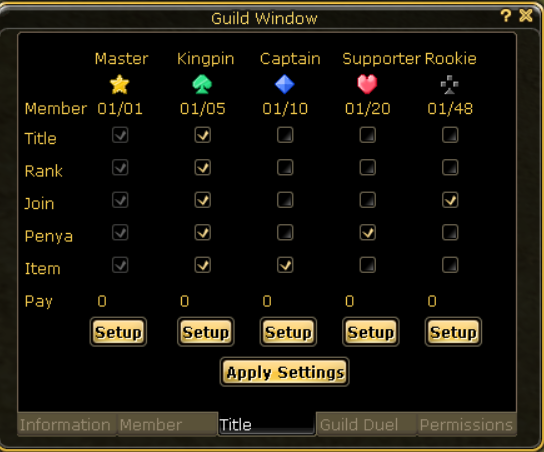
The Title tab is where you can change the permissions of each rank as well as give a salary to people of a certain rank. The method of change is pretty self-explanatory. Check the box under the rank you want to permit, next to the permission you want to give. De-check mark for permissions you want to remove.

  • Title – Allows the member group to change the classification of members under their rank.
  • Rank – Allows the member group to change the class of members under their rank.
  • Join – Allows the member group to invite unguilded members to the guild.
  • Penya – Allows the member group to remove penya from the Guild Warehouse.
  • Items – Allows the member group to remove items from the Guild Warehouse.
  • Pay – Use this button to set the salary of the member group. The salary is paid every 24 hours.
 

The Guild War tab is where you can declare war on other guilds, as well as proclaim peace and surrender. This tab is also where you are able to view your total losses and wins.

  • Guild War – Input the name of the guild you wish to declare war on after pressing this button.
  • Peace – Sends a request for a truce to the opposing guild’s leader.
  • Give Up – Automatically ends the guild war with a loss on your side.
 
 
  • To store and/or remove items – Just drag and drop, like you would do in your bank. Note that everyone can store items in the warehouse, but only members with permission can remove items.
  • To store and/or remove penya – Click the support button, and enter in the amount of penya you wish to place in the warehouse in the Penya field of the pop-up window. Removal of penya is the same as that for your bank.
  • To donate quest items – Click the support button, then check the “Trophy”. Please note that this option automatically takes all of the quest items in your inventory, so if you have any that you don’t want to donate, you might want to place them elsewhere first. Additionally, quest items are automatically taken by the system, and you cannot remove them after you donate. The higher the level of the quest item, the higher the contribution amount.
  • Cloak – This button allows the guild leader to generate cloaks in the guild warehouse if a logo is chosen. (see above) Note that since guild cloaks cannot be traded, the member must be allowed access to remove items from the warehouse to retrieve their own cloak.


Guild Leveling Table

Note: You need to contribute Quest Items and penya to level the Guild.

Guild Leveling Table
Guild LevelItem ContributionPenya ContributionMaximum Members
10030
224520030
32051462532
44853466632
513535803534
6233810028534
7454713934336
8678820800036
91104526325038
101515136111038
112218343257540
122880056160040
133934064911342
144913581072742
156392091406344
1671608102400044
1784365106448346
1891041114872746
19109698123842948
20115152130000048
21134545144300049
22156813160173050
23182351177792051
24211610197349152
25245099219057453
26283396243153754
27327152269900555
28377106299589656
29434090332544357
30499049369124158
31573046409727659
32657283454797660
33753119504825261
34862086560355962
35985913621995063
361126550690414464
371286198766359965
381467338850659466
391672765944231967
4019056311048097368
4121694881163387969
4224683351291360670
4328066771433410271
4431895881591085272
4536227781766104573
4641126771960376074
4746665172176017275
4852924392415379176
4959995992681070777
5070757772975988580

Other Guild Events

Guild Siege is a once-a-week opportunity to match the strength of your guild to that of other guilds. Not only are the rewards high for winning the siege, but so is the honor. This match is held at 7:30 PM UTC. Every Saturday. For further information, please refer to Guild Siege.

Guild Battle Royal is a GM-run event where you can test your guild’s PvM skill. Where 16 of your guild mates will be thrown into a land filled with monsters and giants of all sorts, and tested to the limit. But, all for the most prized possessions available to the FlyFF World. For further information, please refer to Guild Battle Royal.
Note: This has been cancelled for an unknown time.
1V1 Siege is a once-a-week opportunity to match the strength of your guild to that of other guilds. Not only are the rewards high for winning the siege, so is the honor. This match is held at 7:00 PM UTC. Every Saturday. For further information, please refer to 1V1 Siege.

Guild Housing System
Now your guild can have a clubhouse.